

Keeping a computer fast, smooth, and responsive has become more important than ever. Whether you use your PC for work, entertainment, or daily browsing, slow performance can quickly become frustrating. Over time, junk files, cache data, unnecessary background processes, outdated registry entries, and startup programs build up and begin to slow everything down. To solve this growing problem in a smarter way, Advanced SystemCare 19 Free introduces a powerful feature called AI Mode — a tool designed to clean and optimize your PC intelligently.
Unlike traditional cleanup tools that run the same sweep for every user, the AI Mode in Advanced SystemCare adapts to your PC’s behavior, your usage patterns, and the overall health of your system. This makes the cleanup process not only efficient but personalized, ensuring your computer gets the exact maintenance it needs instead of a generic cleanup.
What Makes AI Mode Different?
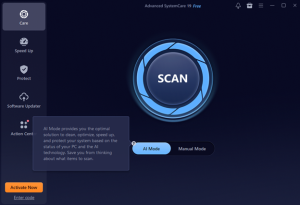
AI Mode is designed to act like a digital assistant for your PC. It quietly observes how you use your computer — how much storage you consume, how many programs you run, which applications start with Windows, and how system resources are used. Based on this information, it creates a custom optimization plan that focuses on the areas where your device needs the most help.
For example, if your PC has a lot of browser cache and temporary files, AI Mode targets junk cleanup first. If you struggle with slow startups due to too many programs launching automatically, it shifts its focus to startup optimization. This dynamic approach ensures your PC always feels faster and smoother.
Key Features Powered by AI
1. Smart Junk File Cleaning
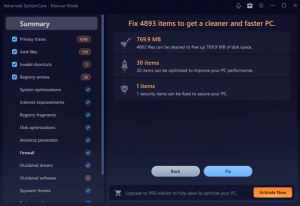
AI Mode identifies unnecessary files like cache, temporary system data, leftover installer files, and browser traces. Instead of deleting everything blindly, it prioritizes files that take up the most space or commonly cause system lag. This helps reclaim storage and boosts overall speed.
2. Intelligent Registry Cleanup
The Windows registry often becomes cluttered over time with invalid entries and broken references. AI Mode safely scans for issues and cleans them without risking system stability. This contributes to smoother performance, fewer errors, and faster response times.
3. Personalized Startup Optimization
Many PCs slow down during startup because dozens of apps run automatically in the background. AI Mode detects unimportant or rarely used startup items and recommends disabling them. With fewer unnecessary programs launching, your PC boots up much faster.
4. Smart Background Process Management
Some software continues running even after you close it, consuming RAM and CPU. AI Mode recognizes heavy or useless background processes and stops them to free up resources. This leads to quicker app loading and an overall more responsive system.
5. Enhanced Privacy Sweep
Your PC stores digital footprints — browser cookies, history logs, temporary internet files, and app traces. AI Mode cleans these intelligently to protect your privacy without affecting your saved information or important settings.
Why Advanced SystemCare’s AI Mode Is Useful
AI Mode takes all the guesswork out of PC maintenance. You no longer need to analyze what’s slowing your system or decide which areas to clean. Just click the Advanced SystemCare AI option, and the program does everything automatically.
This makes it ideal for:
- Beginners or non-technical users who want a clean PC without complicated settings.
- Busy users who prefer one-click maintenance.
- Older computers that struggle with storage and speed issues.
- People who work regularly on Windows and want consistent performance.
The greatest advantage is that everything happens automatically and intelligently. You get the benefits of a professional-level cleanup without touching advanced settings.
What Results Can You Expect?
After using AI Mode, most users experience:
- Faster PC startup
- More free storage space
- Reduced lag during multitasking
- Smoother app performance
- Fewer system errors
- Improved privacy and reduced tracking
- Cleaner, more organized system files
These improvements may seem small individually, but together they bring a noticeable difference to your daily experience. Even older machines feel lighter and more responsive after a proper AI-powered cleanup.
Is It Safe?
Yes, AI Mode focuses on safe cleanup. It avoids system-critical files and does not remove anything that can cause software malfunction. The intelligent scanning makes sure only unnecessary, outdated, or harmful items are removed.
The registry cleaner is also carefully designed to prevent risky deletions and focuses only on invalid entries.
Final Thoughts: Is AI Mode Worth Using?
Absolutely. IObit Advanced SystemCare 19 Free brings a smart and effortless way to maintain your PC. The AI Mode stands out because it doesn’t treat every computer the same. Instead, it delivers personalized cleaning and performance optimization based on your actual usage.
If you want a faster, cleaner, and more efficient computer without spending time on manual settings or technical tools, AI Mode is one of the simplest and most effective features you can use. With one click, your PC gets boosted, cleaned, and optimized — intelligently.