
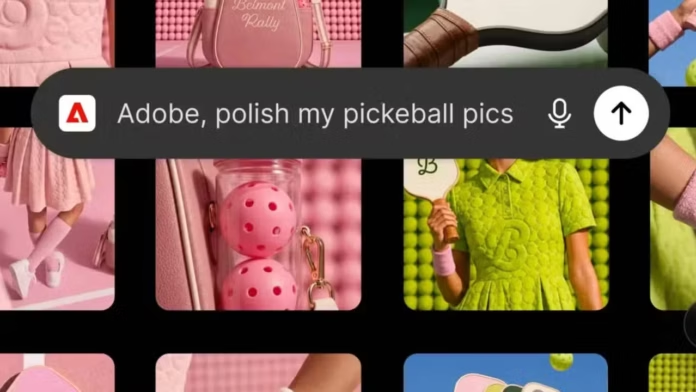

Adobe has launched a new plugin called Adobe for ChatGPT, bringing more than 70 tools from its popular Creative Cloud applications directly into ChatGPT.
The new plugin allows users to perform many creative tasks without opening Adobe’s desktop applications. People can edit images, create PDFs, generate graphics, make short videos and perform other basic editing tasks simply by giving instructions in ChatGPT.
Adobe launched the plugin on August 6, 2026. The company says the new tool is designed to make everyday creative work faster and easier. However, Adobe’s traditional desktop applications will still be better for professional users who need detailed control over their projects.
How Adobe for ChatGPT Works
Using the new plugin is relatively simple. Users can activate it by typing @Adobe in the ChatGPT text box.
After that, users can describe what they want in normal language. They do not need to know complicated editing commands.
For example, a user could ask ChatGPT to create a PDF table from a spreadsheet or turn a long video into a short clip suitable for Instagram.
ChatGPT can then select the appropriate Adobe tool and perform the task.
The processing happens online, so users do not need a powerful graphics card or the relevant Adobe desktop application installed on their computer.
This could make Adobe’s creative tools more accessible to people who only need to perform simple or occasional editing tasks.
More Than 70 Creative Tools
Adobe for ChatGPT brings features from several Adobe applications into one chat-based experience.
These include Photoshop, Firefly, Premiere, Acrobat, Lightroom, Illustrator, InDesign, Adobe Express and Adobe Stock.
Each application provides different capabilities.
Photoshop can be used for image editing, retouching and processing multiple images.
Adobe Firefly provides AI-powered tools for creating images and graphics.
Premiere can help with video editing and turning longer videos into shorter clips for social media.
Acrobat can be used to create and work with PDF documents.
Lightroom provides tools for photo editing and color adjustments.
Illustrator is designed for vector graphics and artwork.
InDesign focuses on page layouts, documents and professional designs.
Adobe Express provides quick tools for creating social media posts and other simple graphics.
Adobe Stock gives users access to Adobe’s library of stock content.
Tasks You Can Complete Through ChatGPT
The plugin is designed mainly for quick and common creative jobs.
For example, users can process multiple images while keeping a similar visual style across them. They can also convert images between different formats.
For video work, users can take a longer video and create shorter versions for platforms such as Instagram and other social media services.
The plugin can also create PDF documents using information from raw data or spreadsheets.
This means users may not have to manually move information between different Adobe applications for simple jobs.
Creative Cloud Users Get More Features
Adobe is offering a basic version of the plugin without requiring users to have an Adobe account.
However, users without an Adobe account will have access to fewer features.
People who already have an Adobe Creative Cloud subscription can access a wider range of tools.
Creative Cloud users can also connect their account to save projects between sessions and use Adobe’s Firefly generative AI features.
The number of AI generations or other available uses can also depend on the user’s ChatGPT plan.
It Is Not a Replacement for Photoshop or Premiere
Adobe says the new plugin is not designed to replace its professional desktop applications.
The ChatGPT integration is mainly useful for quick jobs where users do not need extremely detailed control.
For example, someone who wants to resize several images, create a simple graphic or make a short video clip may find the plugin very convenient.
However, professional designers, photographers and video editors often need precise controls and advanced editing features.
For this type of work, applications such as Photoshop and Premiere will remain more useful.
Users who need pixel-level image editing, complex video timelines, detailed color adjustments or advanced creative workflows will still be better served by Adobe’s full desktop applications.
No Powerful PC Required
One of the biggest advantages of the new integration is that users do not necessarily need a powerful computer.
Because the tools work through ChatGPT and Adobe’s online services, many tasks can be handled without a dedicated graphics card.
This could be particularly useful for people using basic laptops or computers that cannot comfortably run demanding creative software.
It also means users can focus on describing the result they want instead of learning how to operate several different Adobe applications.
Adobe Is Expanding Its AI Strategy
The ChatGPT plugin is part of Adobe’s larger effort to make its creative tools available through AI assistants.
Instead of requiring users to open Photoshop, Premiere or Acrobat separately, Adobe is allowing people to interact with many of its features through natural-language instructions.
Adobe has also announced plans for similar integrations with other AI platforms, including Claude, Microsoft Copilot, Slack and Google Gemini.
This shows that Adobe is increasingly using conversational AI as another way for people to access its creative technology.
What This Means for Users
Adobe for ChatGPT could make basic creative work much easier for everyday users.
Someone who does not know how to use Photoshop could potentially describe an image-editing task in simple words and let the AI handle the appropriate tools.
Content creators could also use the integration to quickly prepare social media images, convert files, create PDFs or produce short video clips.
At the same time, professional users will still have access to Adobe’s full applications when they need more advanced features.
Overall, Adobe for ChatGPT is being positioned as a quick and convenient way to access Adobe’s creative tools through conversation. It does not replace Photoshop, Premiere, Illustrator or other professional applications, but it could make many everyday creative tasks faster and easier.