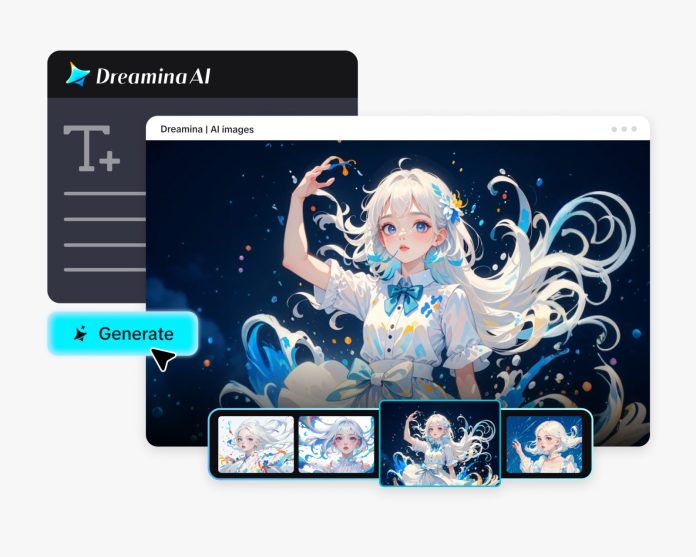

Digital banners used to be polite little rectangles: static, stiff, and so silent that most people scrolled right past them without ever noticing. But today’s banners? They’ve come alive. They bounce and sway and shimmer; some practically perform. With Dreamina and tools like an AI image generator helping designers concept visuals faster than ever, banner animation has gone from a technical add-on to an expressive design language.
Bounce is not just a cute effect, but psychology, physics, timing, and storytelling in the tiniest moving space.
Why banners bounce in the first place
A bounce animation does something incredibly important: it makes a digital element feel responsive. When something moves on hover or scroll, your brain interprets it as “alive.” That triggers instinctive attention. Even a small micro-bounce can guide the eye to a button, headline, or product without feeling intrusive.
Depending on the emotion a designer wants to trigger, there are different styles of bounces:
- A soft, pillowy bounce to create friendliness
- Quick elastic pop to suggest energy
- Downward dip to give the impression of weight and the pull of gravity
- A slow lift for calm anticipation
These small decisions affect the viewer’s emotional reading of the banner.
How movement gives banners personality
Modern banners often act more like characters than graphics. A headline that vibrates can feel cheeky. A floating product can feel luxurious. A gently pulsing CTA can feel warm and inviting.
What makes these movements work is timing. Delays between frames, softness of the curve, ease-in and ease-out behaviors—these micro-decisions create personality. Two designers could animate the same shape and get completely different emotions depending on the rhythm.
Some even use layered motion: an icon bounces first, then a shadow reacts, then the background adjusts. These stacked movements simulate real physical environments and help ground the banner to make it feel believable.
How creators prototype and bounce ideas
A lot of designers play with bounce timing, easing curves, and motion flow by running quick animation tests via an AI video generator before committing to final code. That helps them preview how their banner concepts could behave, whether something should pop faster, settle slower, or stretch more organically. This approach creates the feeling that the motion is intentional and not random, because designers can compare versions rapidly and choose the one that feels most alive.
Tiny animations, tiny stories
Even the smallest motion can carry meaning. A button that lifts when hovered tells the user, “Come this way”. A character illustration that dips down feels like it’s bowing. A background pattern that rhythmically shifts adds mood without overwhelming the design.
Banners are tiny spaces, but they can still hint at narratives. For example:
- A product rising into frame as if it’s entering a spotlight
- Sparkles drifting outward to imply celebration
- Tan underline that draws itself in rhythm with the headline
- A jumping form that nudges the viewer’s gaze This storytelling keeps banners from feeling like ads and instead makes them feel like moments.
Energy without chaos
In the first place, a modern bounce effect is controlled. Old digital ads used movement that was too loud, flashing, spinning, shaking, and demanding attention. Today’s motion is more like choreography, with rhythm, breath, and subtlety.
The best banners feel:
- Soft instead of frantic
- Rhythmic instead of random
- Expressive, not distracting
- Alive instead of noisy
Designers purposefully avoid going “too animated,” since the modern aesthetic tends towards motion that feels like a gentle invitation rather than a shout.
Making your own lively banner base with Dreamina
Before animation, there’s the still visual—the canvas that will soon bounce, glow, or sway. Dreamina helps you create this base artwork with precision and creative freedom. Once you shape the design, you have the perfect foundation to bring movement to life.
Here’s how to create that banner-worthy visual:
Dreamina’s bounce blueprint
Give your banner an identity before you give it motion. Think of the artwork as the character and the animation as the personality you’ll apply later. Once you know what mood you want, whether playful, sleek, energetic, or soft, you can create the perfect starting visual through Dreamina.
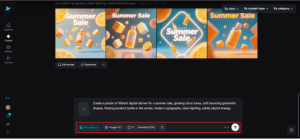
Step 1: Create a text prompt
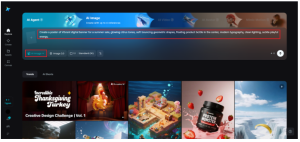
Go to Dreamina and give as detailed a description of your ideal banner as you can. Mention the aspects you would want to have highlighted, as well as the colors, atmosphere, lighting, and mood.
Example prompt:
“Vibrant digital banner for a summer sale, glowing citrus tones, soft bouncing geometric shapes, floating product bottle in the center, modern typography, clean lighting, subtle playful energy.”
Step 2: Adjust the parameters and produce
To create your banner artwork, select your model, aspect ratio, size, and resolution (1k or 2k), then hit the Dreamina symbol. These are settings that define sharpness, proportions, and the overall visual feel before applying movement.
Step 3: Personalize and download
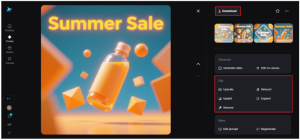
Refine your artwork and perfect even the tiniest details using Dreamina’s tools: inpaint, expand, remove, and retouch. If it feels right, click the icon “Download” to save your base for further motion design.
Motion as an emotional highlight
Of course, a bounce isn’t always the star of the show. Sometimes it’s just the emotional garnish: a shimmer behind a photo of the product, a soft text expand, or a floating accent shape is sometimes enough to dress up the banner.
Designers often blend various types of micro-motion-shift, glow, flicker, stretch to create emotional color without overwhelming the viewer. These effects add texture and depth, making the banner feel dimensional even if it’s technically 2D.
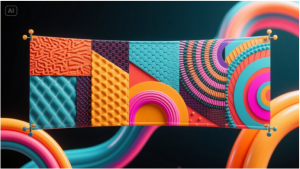
And when they want to experiment with stylistic textures or surreal composition ideas before animating, many creators turn to an AI art generator to conceptualize visuals that break the usual boundaries.
Putting it all together
Animated banners aren’t louder; they’re more lively. A tiny bounce can tell a story, direct attention, or turn an ad that could feel like a digital interruption into a friendly nudge. Dreamina helps creators craft the imagery that becomes the heart of these motion-ready banners, giving every designer the chance to bring their visuals to life with personality, timing, and charm.