
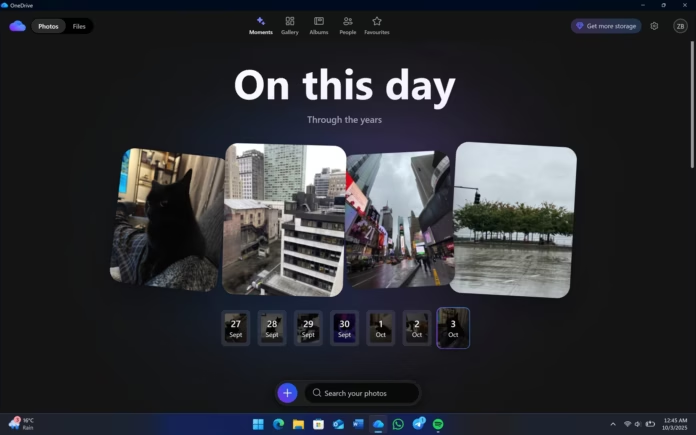

Microsoft has confirmed that it accidentally installed its new AI-based OneDrive Photos app on more Windows 11 computers than planned.
The new app is still being tested in beta. Microsoft originally intended to release it only to a limited number of Windows users, but it was distributed to a much larger number of PCs. Some enterprise and business computers also received the app, even though OneDrive Photos is mainly designed for people using personal Microsoft accounts.
Microsoft says it is now working on a fix. The company also plans to give users a separate option to remove OneDrive Photos without uninstalling the main OneDrive application.
OneDrive Photos Was Released by Mistake
OneDrive Photos first appeared on Windows Insider computers earlier in 2026. These systems are used by people who test upcoming Windows features before they are released to everyone.
However, starting August 1, some regular Windows 11 users began noticing the new OneDrive Photos app on their computers. The app was later distributed to an even larger number of systems that had the OneDrive Sync client installed.
Microsoft admitted that the new Photos experience was released more widely than intended.
The company said it is working to correct the problem. Microsoft also confirmed that the existing Windows Photos app will continue to work and will still allow users to choose between photos stored on their computer and photos stored in OneDrive.
What Is OneDrive Photos?
OneDrive Photos is a new photo experience that brings together pictures stored on a Windows PC and images saved in OneDrive.
The application can find photos stored in different personal folders on a computer. It can also access photos outside the normal Pictures folder.
The app connects to the OneDrive.com Gallery and uses Microsoft Edge WebView2 technology. In simple terms, much of the experience is similar to opening OneDrive’s photo gallery on the web, but it is displayed through a Windows application.
Users can perform several tasks through the app. They can create photo albums, mark pictures as favourites and stop OneDrive from scanning certain locations on their computer.
The App Uses Additional Memory
OneDrive Photos generally uses less than 1GB of memory on a computer with 32GB of RAM.
However, memory usage can increase when users browse through a very large collection of pictures. In some situations, the application can use between 1GB and 2GB of RAM while loading and moving through many images.
This may not be a major problem on modern computers with plenty of memory, but it could be more noticeable on PCs with lower RAM.
Why Did the App Appear Automatically?
The problem is connected to the OneDrive Sync client that is already installed on many Windows 11 computers.
The OneDrive Sync client normally runs in the background and manages the syncing of files between a PC and OneDrive. Microsoft allowed the client to download and install the new OneDrive Photos application.
Interestingly, the installation did not depend on whether the user was signed in to a Microsoft account.
The OneDrive Photos application is installed in this location:
C:\Program Files\Microsoft OneDrive\OneDrive.App.exe
The main OneDrive application is located separately:
C:\Program Files\Microsoft OneDrive\OneDrive.exe
This difference is important because the new Photos app is connected to the main OneDrive installation rather than being treated as a completely independent application.
Enterprise Computers Were Also Affected
The accidental rollout caused more concern for companies and IT administrators.
OneDrive Photos is designed for personal Microsoft accounts, so it was not supposed to appear on many Windows 11 Enterprise computers. It also was not expected to be installed on computers managed through Microsoft Intune.
Despite this, the application appeared on thousands of computers, including some business and enterprise systems.
For IT administrators, the biggest problem is that OneDrive Photos cannot currently be removed by itself. Removing it also requires removing the main OneDrive application.
This can create problems for companies that depend on OneDrive for file syncing and File Explorer integration.
Some administrators reported seeing the OneDrive Photos application in the Start menu on many computers managed by their organizations.
Microsoft says it is working on a solution for enterprise users. The company plans to automatically remove OneDrive Photos from unsupported enterprise computers managed through Intune.
Consumer Users May Have to Wait
Microsoft does not currently plan to automatically remove the application from consumer Windows 11 computers.
This means that if OneDrive Photos appeared on a personal computer, the user may have to keep it installed for now if they want to continue using the main OneDrive application.
Microsoft says this will change in a future update. The company is working on a new control that will allow users to remove OneDrive Photos separately.
This will be a better solution because people will be able to keep OneDrive for file syncing while removing the new Photos experience if they do not want it.
Can You Remove OneDrive Photos Now?
At the moment, there is no official way to uninstall only OneDrive Photos.
The only available option is to uninstall the complete OneDrive application.
Users can do this by following these steps:
- Open Settings on Windows 11.
- Go to Apps.
- Select Installed apps.
- Search for OneDrive.
- Click the three-dot menu next to OneDrive.
- Select Uninstall.
- Restart the computer if Windows asks you to do so.
However, users should be careful before doing this.
Uninstalling OneDrive will also remove the main OneDrive Sync client. This can affect OneDrive file syncing, File Explorer integration and OneDrive-related shortcuts.
Therefore, users who regularly use OneDrive should probably avoid uninstalling it just to remove OneDrive Photos.
Windows Already Has Other OneDrive Features
Windows 11 already includes several features connected to OneDrive.
One example is Windows Backup, which can save personal folders, settings and certain account information to OneDrive.
Another important component is the OneDrive Sync client. It can continue running in the background even when users are not actively transferring files.
The accidental OneDrive Photos installation shows how background services can sometimes deliver new features to Windows computers without users specifically asking for them.
Microsoft Is Working on a Solution
Microsoft has acknowledged the problem and says it is working on a fix.
For enterprise computers managed through Intune, the company says OneDrive Photos will be removed automatically when the fix is deployed.
For personal computers, Microsoft plans to provide a separate removal option in a future update.
Until then, users who want to continue using OneDrive’s normal file-syncing features may need to leave OneDrive Photos installed.
The situation also highlights an important issue with Microsoft’s approach to delivering new Windows features. Because OneDrive Photos was connected to the existing OneDrive Sync client, the new application reached many computers without users directly installing it.
Microsoft’s upcoming update should make the process easier by giving users more control over the Photos application while allowing them to keep the main OneDrive service.